Each fault has its own ticket, with a technician, parts, photos and chat.
An agent finds a broken machine. What happens next?
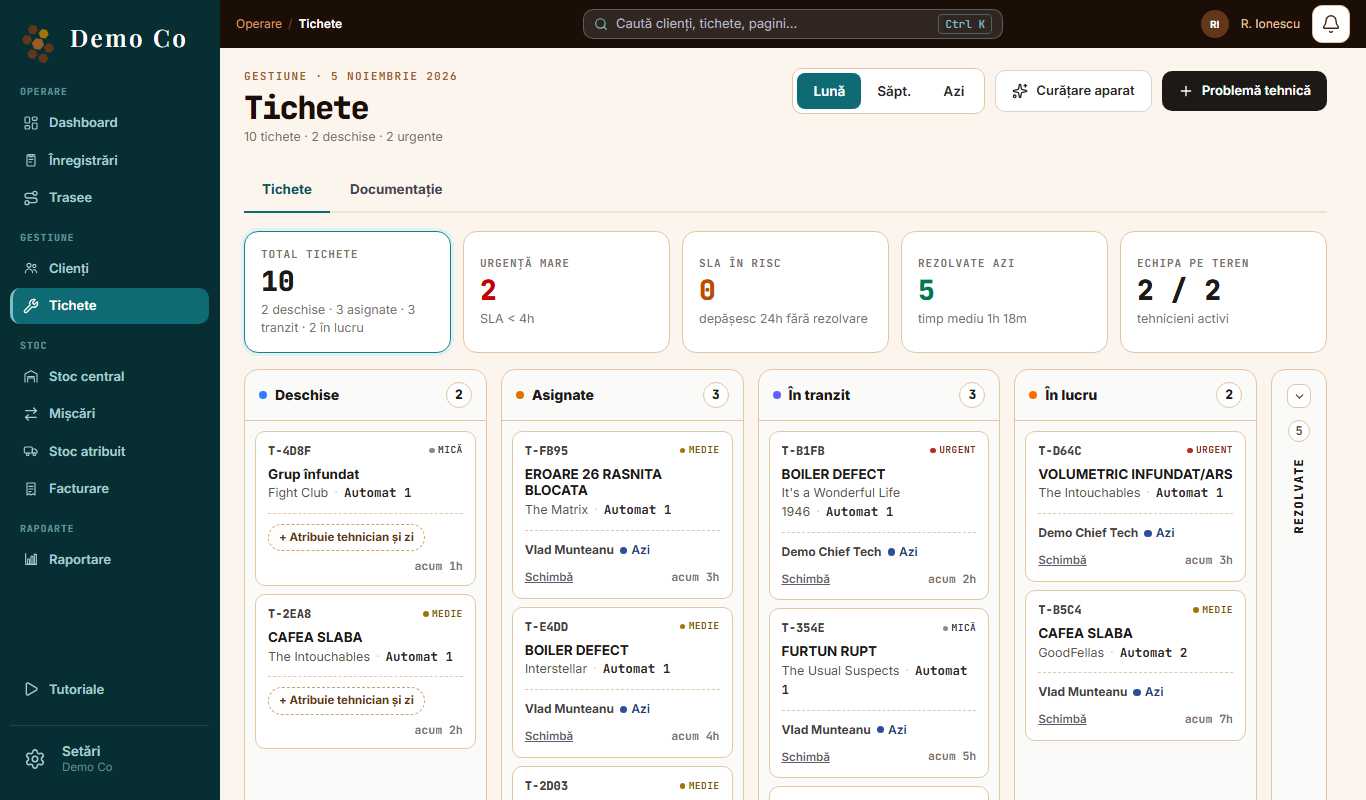
They tap New ticket, choose the client and machine, write what is wrong and add a photo. You get a push notification.The Tickets tab, from the Demo Co account, in Romanian
Florin M.
How do I give it to a technician?
Open the ticket, tap Assign technician and choose the day. Each ticket has one technician. If the plan changes, tap Reassign.
Marius P.
How do I know where it has got to?
In the Tickets tab, in columns: Open, Assigned, In transit, In progress, Resolved. The technician taps Head to client, then Arrived on site, and you get a push notification on every status change.
Florin M.
What about parts?
You give the technician parts in Assigned stock, with Add spare parts, and they appear under Van stock. On the ticket, the technician adds the part and marks it Used or Returned.
Marius P.
How do I talk to the technician about the fault?
In the ticket chat. Write a message, add photos and mention a colleague with @. It all stays on the ticket.
Florin M.
Has this machine broken before?
Look under Previous repairs: what was repaired and which parts were used. If the problem comes back, tap Reopen.
Marius P.
What if the technician does not know the machine?
They open the manual in Documentation or ask the Assistant. We switch these on separately for each company.
 Florin M.
 Marius P.