Everything about a client and their machines, in one place.
I signed a new client. Where do I start?
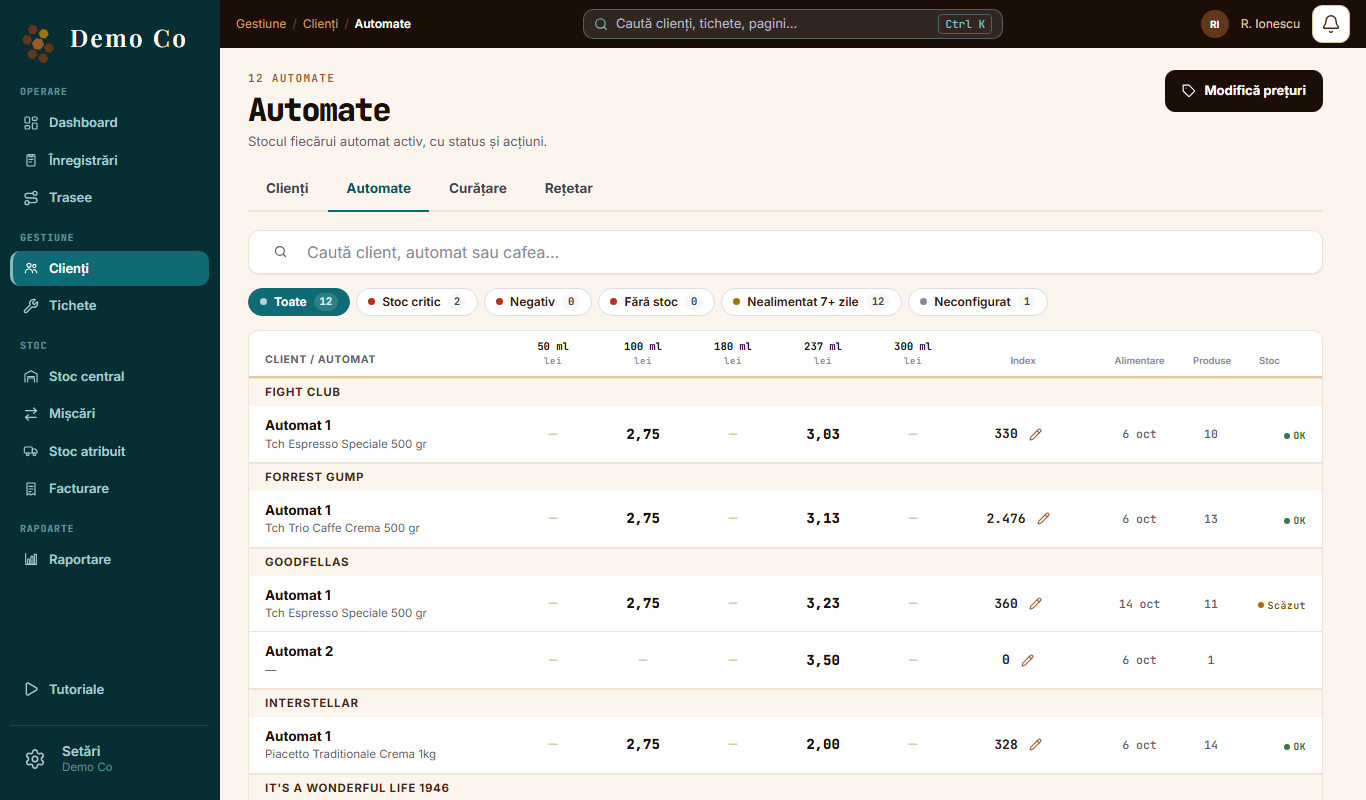
Add them in Clients, tap Add machine and set up the products for each machine. When refilling, the agent sees only the products you set up. Then put the client on an agent's route.The Machines tab, from the Demo Co account, in Romanian
Florin M.
What is on the client file?
The machines, the contract, the refill history, Reading photos and Previous repairs. You can also filter the client list by Not refilled 7+ days or Overdue.
Marius P.
I want to change the price on many machines.
In the Machines tab, tap Change prices. Choose today's price, write the new one, in lei or as a percentage, and choose when it starts. The steps are in the price guide.
Florin M.
Can cup sizes have different prices?
Yes. The price is kept per machine and per cup size. When you change one, the other sizes stay as they are.
Marius P.
How much does a cup use?
Set that in the Recipe book: choose the cup size and the consumption of each product. When you save, choose Apply to all or Only to newly added machines. The Recipe book opens on a computer.
Florin M.
What is that for?
From the consumption per cup and the cups since the last refill, the app suggests how much the agent should add. The agent can choose another amount.
Marius P.
And cleaning?
In the Cleaning tab, you set rules per machine model, by consumption or by calendar. At the end, the agent answers Yes, cleaned or I did not clean, with the reason. Cleaning is switched on separately for each company. See the cleaning guide.
 Florin M.
 Marius P.