See collections and cups for any period, close the month, and download in Excel or PDF.
How did last month go?
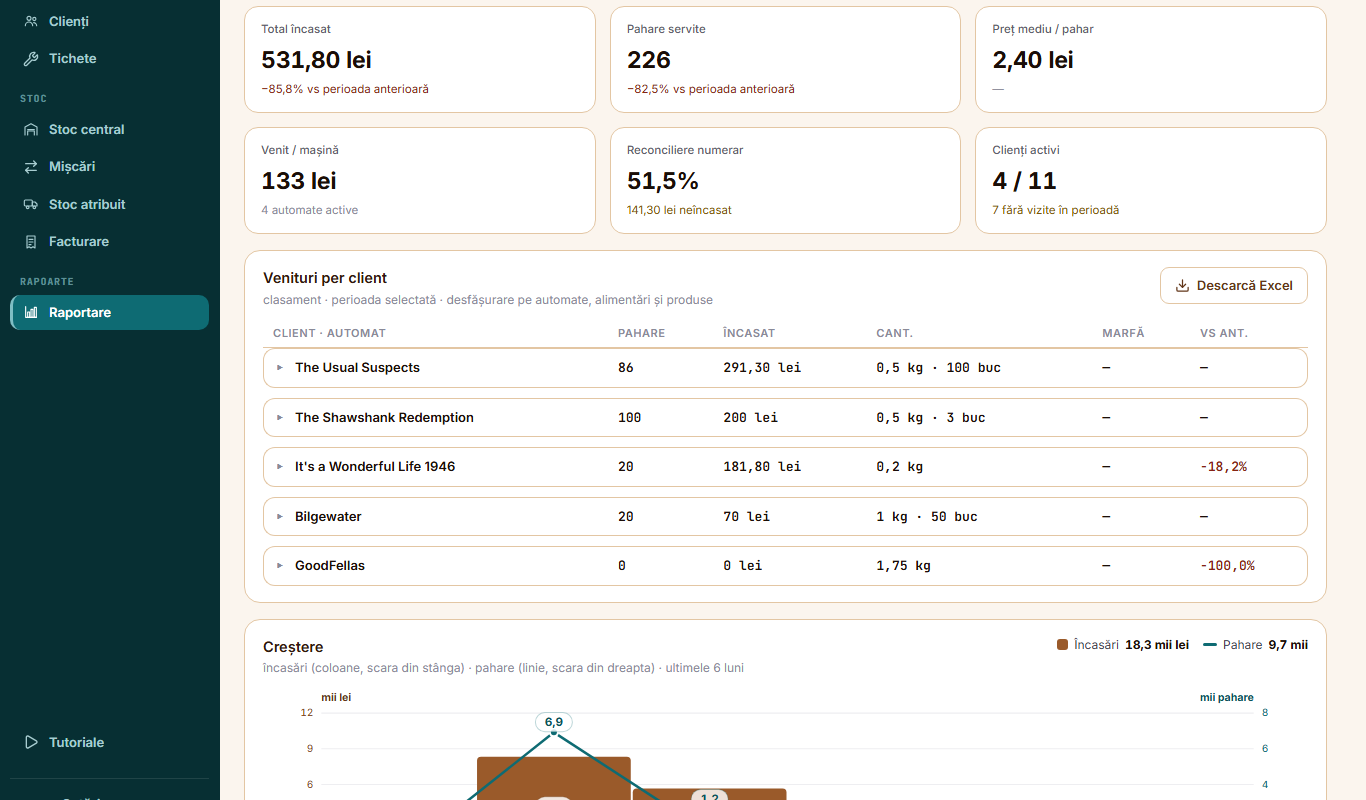
In Reporting, the Sales tab, choose the period. You see the total collected and the cups, compared with the previous period, plus revenue per machine. Under Revenue per client, you open each client down to machines, refills and products.The Sales tab, from the Demo Co account, in Romanian
Florin M.
Which clients should worry me?
Client triage marks them Healthy, Watch or Risk, from revenue, collections and idle machines. Client dependency shows how much revenue comes from your largest clients.
Marius P.
And machines that are doing badly?
Machines needing attention lists machines with no visit, idle machines and those with revenue far below average, for the period you chose.
Florin M.
How are the agents collecting?
Cash by agent shows the cash collected, what was invoiced and what clients still owe.
Marius P.
How do I close the month?
In Monthly reporting, check the figures and tap Close the month. The figures stay fixed and carry your name. A closed month cannot be reopened, so the app asks you to confirm.
Florin M.
Can I get the data in Excel?
Yes. Sales download in sheets: clients, machines, visits and products. The collection sheet comes as Full, Financial or Stock. You can also download the month closing, central stock, records and movements. The full list is in the Excel guide.
Marius P.
And in PDF?
The month's collection sheet downloads as a PDF, with Export PDF. Invoices issued from the app open as PDFs too.
Florin M.
Can I protect the files?
Yes. In Settings, set a password on Excel exports with Protect Excel.
 Florin M.
 Marius P.