You know what was collected on each visit and what each client still owes.
How much is owed, and by whom?
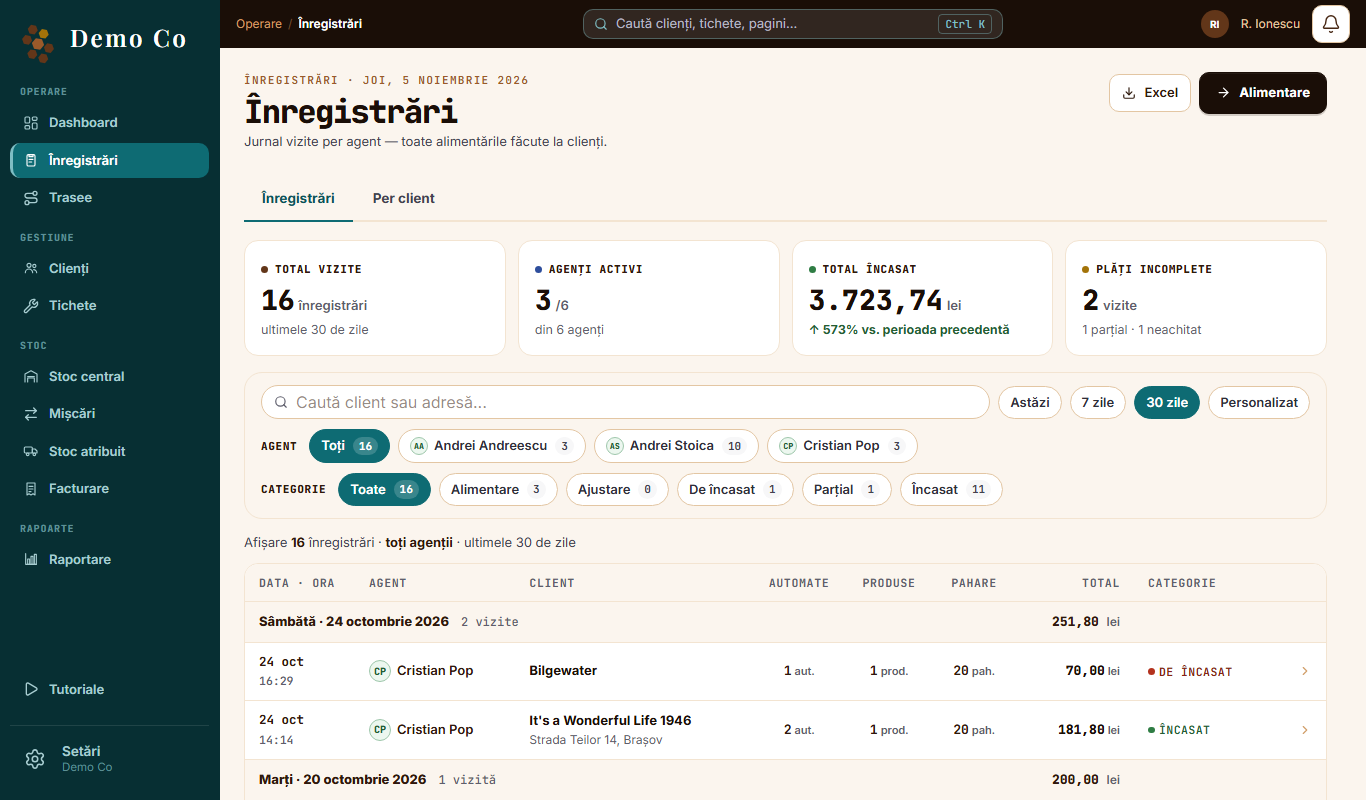
In Records, each visit has the total, the amount collected and what is left to pay. Filter by agent, period or category: Refill, To collect, Partial, Collected.The Records tab, from the Demo Co account, in Romanian
Florin M.
Where does the amount come from?
The agent enters the reading and the products, and the app works out the total to collect. The agent chooses No payment, Partial or Full and taps Finish.
Marius P.
Some clients pay on terms.
Each client has a contract type: paid on the spot or a payment term in days. You can add your own types under Manage types.
Florin M.
The agent entered the wrong amount. Can I change it?
Yes. Open the record and tap Correct the payment. The record keeps who corrected it and when.
Marius P.
Can an agent issue an invoice at the client?
Yes, if your company is in Romania and we switch invoicing on. They tap Issue invoice, then Collect, in cash or by transfer. They can send the PDF straight from the phone. Issuing needs a connection.
Florin M.
And e-Factura?
Romania only, switched on separately. You connect your ANAF account in Settings, then tap Send to ANAF on the invoice and follow it with Check status.
Marius P.
I use SmartBill.
Connect the account in Settings, and goods-sale invoices and invoices from refills are issued through SmartBill. The number comes from SmartBill. If you reverse a goods invoice, the stock returns to the warehouse. The connection is switched on separately for each company.
Florin M.
I also have a Shopify store.
Paid orders reduce stock in the warehouse you choose and appear in Records, tagged Shopify. Returns and cancellations put the goods back. This connection is switched on separately too.
 Florin M.
 Marius P.