How it works
The agent opens the ticket
They write what is wrong and add a photo.
The manager picks the technician
Each ticket has one technician.
The status shows in the app
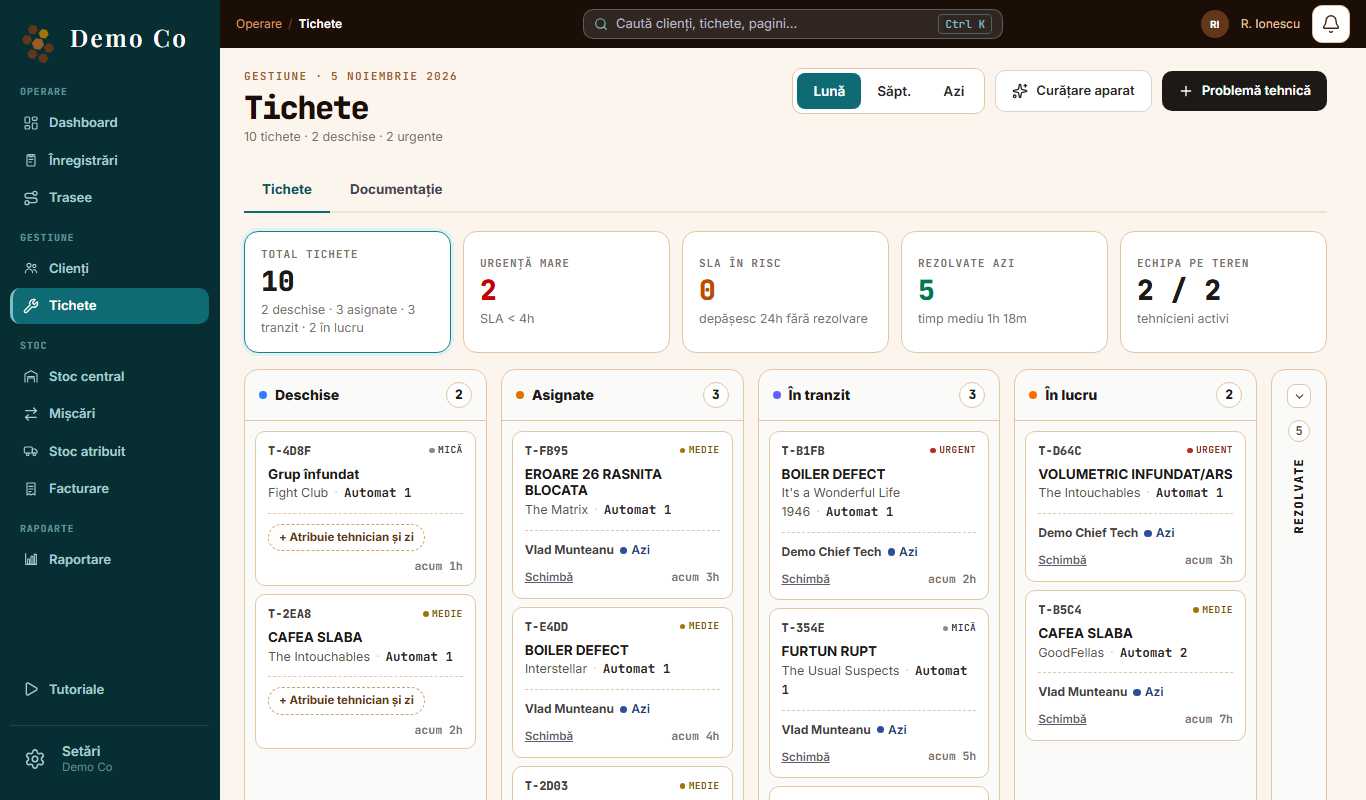
Open → Assigned → In transit → In progress → Resolved.
The technician closes the ticket
If the problem comes back, the ticket reopens.
What you find on a ticket
- The machine and the client
- Chat between the manager and the technician
- Photos
- The parts used
- Push notifications on every status change
The machine history
Each machine has its own repair history: what was repaired and which parts were used.
How the technician works
The technician has everything on the phone:
Gets the ticket
A notification arrives and opens the ticket directly.
Heads to the client
They tap “Head to client”, then “Arrived on site”. The status changes and you see it in the app.
Help for the technician
If they do not know what is wrong with the machine, they open the manual in Documentation or ask the Assistant in the chat. It tells them what an error means, which code the part they need has and how to repair the fault, right at the machine.
Notes what was done
They list the parts used, add photos and write in the ticket chat.
Closes the ticket
They tap “Mark resolved”.
The technician's Assistant
You upload the manuals of your machines in Documentation. The Assistant reads the text in them, and the technician asks it in the chat, like a colleague:
- “What does error 26 mean?”
- “Which code does the part I need have?”
- “How do I repair this fault?”
It answers only from your documents and shows the document and the page the answer came from. If the information is not in the documents, it says so plainly. The Assistant answers in Romanian.
Where you see the tickets
In the Tickets tab you see each ticket in a column, by status. The app works on the phone and on the computer.
Questions
Do I need sensors on the machines?
No. Tickets start from what your team reports.
What does the technician see in the app?
Four tabs: Van stock, Tickets, Documentation and Assistant.
Got a question?
Message us on WhatsApp.
Contact us