How it works
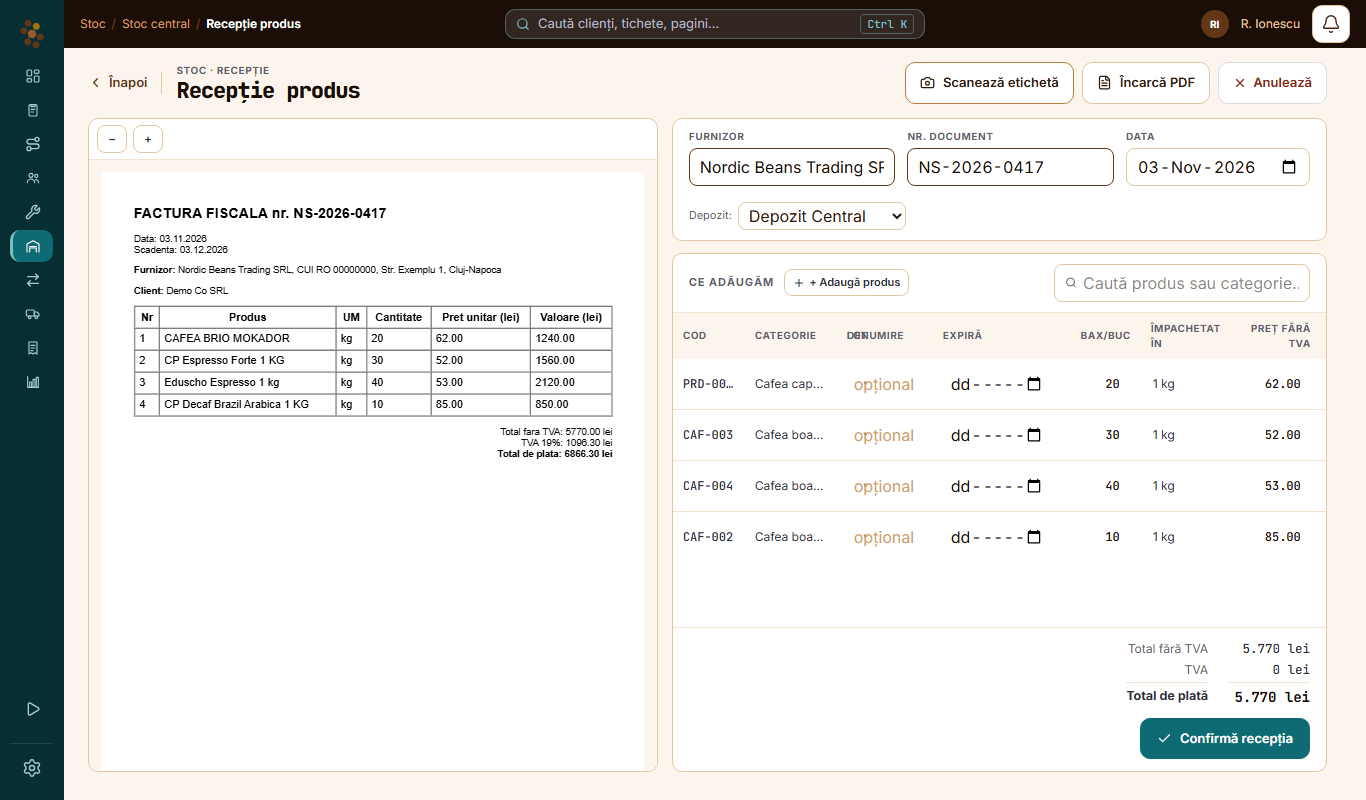
Go to Central stock and tap Receive.
1
Pick what you receive
Products (coffee, milk, cups, consumables), equipment or spare parts for service.
2
Upload the invoice
A PDF or a photo, up to 12 MB.
3
The app reads it
It pulls out the products, the quantities, the supplier and the date.
4
Check
You see what it read and correct what needs it. If a pack size does not match, Check the packaging appears.
5
Confirm
You tap Confirm receipt, and the products enter the chosen warehouse.
Labels
You tap Scan label and photograph the box label. The app fills in the product, the lot number and the expiry date.
When it does not work
- If the app skips lines on the invoice, it tells you how many.
- If the invoice cannot be read, you add the products by hand.
Questions
Do I have to check what it read?
Yes. Nothing enters stock until you tap Confirm receipt.
Does it work for parts and equipment too?
Yes. You pick the type at the start, and the invoice is read the same way.
Got a question?
Message us on WhatsApp.
Contact us